Most security engineers don't live in a single dashboard anymore. They live in an editor, a terminal, and, increasingly, an AI client where they can ask questions in plain English and pull context from a dozen tools without switching tabs.
So we put Nano EASM there too.
How it works
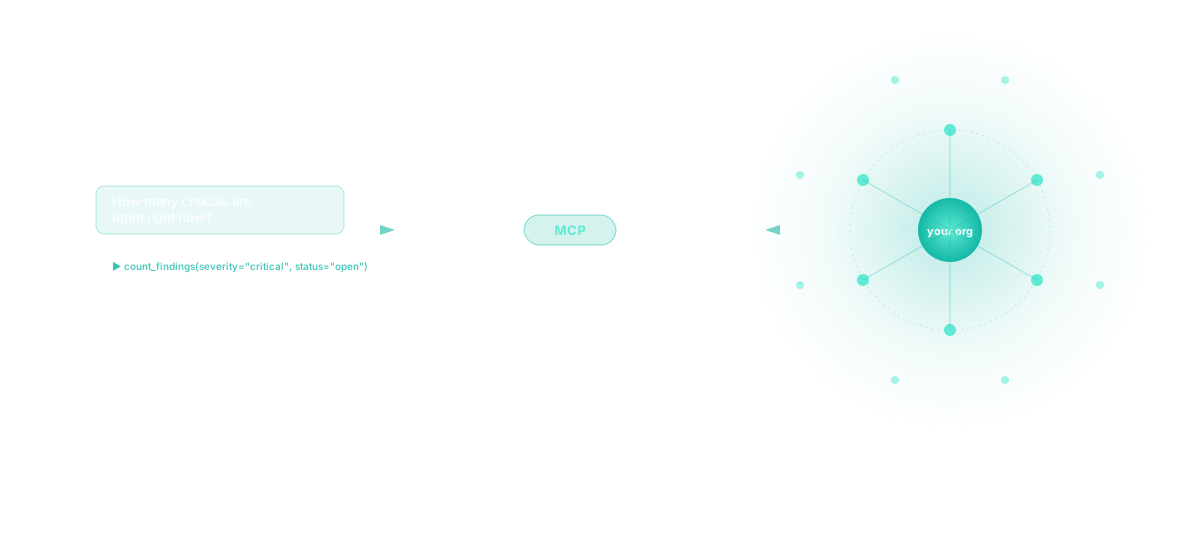
Nano EASM speaks the Model Context Protocol (MCP), the open standard for connecting AI assistants to external tools and data. Any MCP-capable client (Claude Desktop, Cursor, VS Code, custom agents you've built) can connect directly to your Nano EASM tenant and query your attack surface.
It's read-only in this first release. We deliberately shipped the read surface first so you can use it before we layer in writes. You can ask things like:
- "How many critical findings are open right now?"
- "Show me everything discovered on
dev.*in the last week." - "What scan jobs ran on
api.prod.example.com, and what did they find?" - "Summarise the monitors that fired this week."
- "Which assets in tier-1 have a CWE-200 finding still open?"
The AI does the natural-language part. Nano EASM provides the tools. Your data never leaves your tenant.

14 read-only tools, six domains
The MCP server exposes 14 tools, every one of them scoped to the caller's organisation:
| Domain | What you can ask |
|---|---|
| Assets | List, filter (by type, scan status, criticality, group), or search by hostname/IP |
| Findings | List, filter (severity, status, asset, template, age), count by group, fetch full detail |
| Scan jobs | List, filter (status, asset, profile, initiator, age), fetch full breakdown |
| Discovery jobs | List, filter (status, target, target type, age), fetch module-level results |
| Monitors | List, filter (enabled, asset, group), fetch recent alerts for one monitor |
| Dashboard | Top-level summary stats + your plan / usage info |
The full tool catalogue with input schemas is auto-generated directly from the server registry: what's documented is exactly what's live.
Connecting in under a minute
There are two ways to wire it up. Pick whichever your client supports.
Option 1: Direct HTTPS (any modern MCP client)
If your client speaks MCP over HTTP (Cursor, VS Code with the latest extensions, custom agents), point it at our hosted endpoint:
URL:    https://mcp.nanoeasm.com
Header: Authorization: Bearer mcp_sk_…
That's the entire integration. Two values.
Option 2: Local stdio bridge (Claude Desktop)
For clients that only speak stdio MCP (current Claude Desktop builds), install our published bridge:
pip install nano-easm-mcp
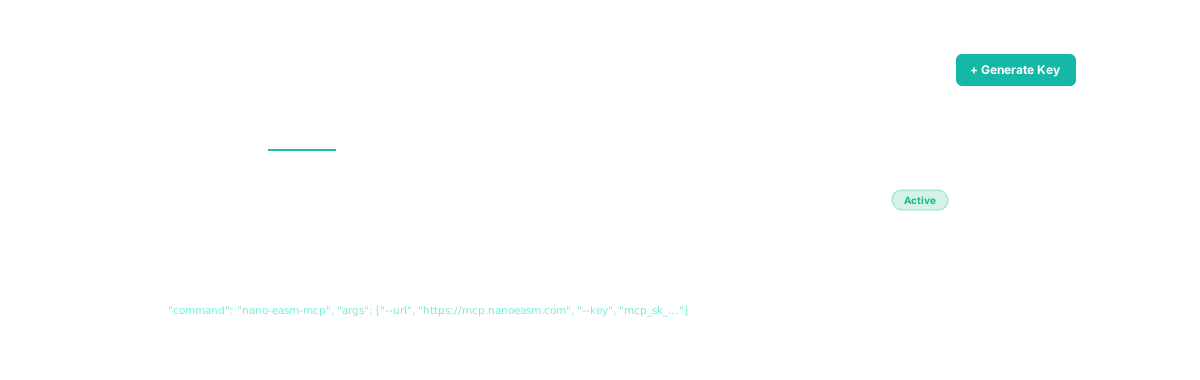
Then drop this into your Claude Desktop config (~/Library/Application Support/Claude/claude_desktop_config.json on macOS, %APPDATA%\Claude\claude_desktop_config.json on Windows):
{
  "mcpServers": {
    "nano-easm": {
      "command": "nano-easm-mcp",
      "args": ["--url", "https://mcp.nanoeasm.com",
               "--key", "mcp_sk_…"]
    }
  }
}
Restart Claude. You're done.
Getting the key
Sign in to Nano EASM, go to Settings → API Keys → MCP keys, click Generate Key, name it ("Claude Desktop - laptop" works), and copy the mcp_sk_… value. The plaintext is shown once at generation, then only the prefix is kept, same UX as the existing REST API keys.
Why this changes the workflow
The point isn't novelty. It's that the alt-tab tax is over.
When you're investigating an exposure, the friction isn't usually the answer: it's the path to it. Open the dashboard, navigate to findings, set three filters, scan the list, click into the row, hold the asset name in your head, switch to the asset detail page, cross-reference the scan history. By the time you've got the picture, the thought you were chasing has cooled.
With MCP, the same investigation collapses into a single question and a single answer in the editor or chat window you were already in. The AI handles the navigation. You stay in the flow.
What's exposed, and what isn't
We picked the read surface deliberately. Here's exactly what's covered:
Exposed (read-only): every asset, finding, scan job, discovery job, monitor, monitor alert, and dashboard rollup belonging to the caller's organisation. Same data you'd see in the UI, terser shape to fit cleanly in the AI's context window.
Not exposed, ever:
- Admin / billing / auth surfaces: these are off-limits regardless of role. An MCP key can never change a plan, manage members, or read the audit log.
- Other organisations' data: every list endpoint asserts the caller's org before any row is returned. We have a parametrised test (
test_org_scope.py) that exercises this on every list tool; if one ever leaks org B's data to org A's key, the build fails. - The internal agent platform: Nano EASM also runs an internal agent platform (Sam, Rob, Aisha, and friends) for our own ops. Those agents are completely separate; an MCP key cannot reach them.
We'll add write operations (add asset, trigger scan, acknowledge finding) in a Phase 2 release once we've seen the read patterns settle. The registry has room for them from day one.
Built for trust by separation
A couple of design decisions worth flagging if you're auditing this for your org:
MCP keys are isolated from REST API keys. Internally we store them with kind='mcp'. A leaked MCP key cannot call our REST API. A leaked REST key cannot call MCP. They share the per-org "API keys" budget (so you don't need a new plan tier), but their blast radii are decoupled. Revoke either independently.
Every tool call is audit-logged. We record the tool name and the argument keys (not values; we don't store the contents of your queries). Available under category='mcp' in your audit log if you're on a plan that includes it.
Rate-limited per key. 60 tool calls per minute, default. Enough for any human-driven session; tight enough to contain a runaway agent loop.
TLS-only, hosted in the same region as your data. No new infrastructure to trust. The MCP endpoint sits next to the application that already holds your data.
The bottom line
If your security team is already using AI assistants for half their daily work, your attack-surface tool should be reachable from inside those assistants. That's the whole bet behind shipping this.
Generate an MCP key, paste two lines into Claude Desktop, and ask it about your attack surface. The integration is live now at mcp.nanoeasm.com. No waitlist, no extra cost, included on every plan that has API keys.
Try it now: sign in to Nano EASM, head to Settings → API Keys → MCP keys, and generate your first key. We'd love to hear what you ask it.